
Why Your IT Company Is Not Your HIPAA Compliance Officer

Intro
The OCR data request letter shows up on a Monday, and your office manager does what seems sensible. She scans it and emails it to your IT company with a one-line note asking them to “send over our HIPAA stuff.” The account manager replies Wednesday afternoon, and he’s very polite about it. He attaches a network diagram from 2023 and last month’s backup report, then points her to a clause in your master services agreement stating that regulatory compliance remains the customer’s sole responsibility. He’d be happy to quote a compliance assessment, though. Nobody in that exchange did anything wrong, which is the irritating part. The IT company did exactly what it was hired to do, and the contract said so in plain English 3 years ago. (Plain-ish English. It was an MSA.) Your practice simply assumed the people who keep the computers running were also the people keeping the practice compliant, and nobody corrected that assumption until a federal agency did it for you.
HIPAA Wants a Name, and It Has to Be Yours
The Security Rule requires you to identify a security official responsible for developing and implementing your security policies and procedures under 45 CFR § 164.308(a)(2). The Privacy Rule requires you to designate a privacy official, plus a contact person for complaints, under 45 CFR § 164.530(a). These are named roles inside your organization, and when OCR asks who holds them, “our IT guy, I think” is the wrong answer in at least 2 ways. You can hire outside help for much of the work, but the covered entity remains ultimately accountable, no matter how many vendors touch it. That’s the same principle we covered with Business Associate Agreements in Part 3 of this series, and most IT contracts are written to make sure you understand it, even if nobody at your practice has read that page since the day it was signed.
What Your IT Company Is Good At
Credit where it’s due. A competent managed service provider handles a meaningful share of the technical safeguards at 45 CFR § 164.312, including access controls, audit logging, encryption, and the patching and backups that keep your systems standing. They roll out MFA, monitor your endpoints, and pick up the phone when the printer develops a personality. (The printer will always develop a personality, and we compliance folks can’t help you there, either.) Plenty of the controls OCR expects to find at your practice exist because someone at your IT company configured them. That work matters, and it’s also a narrow slice of the regulation. Technical safeguards are 1 of 3 safeguard categories in the Security Rule. Even inside that category, your IT company implements controls, while your compliance program decides which controls your risk analysis calls for and documents why.
Where the Gap Opens Up
Most of HIPAA has nothing to do with the server closet. The administrative safeguards at 45 CFR § 164.308 require a sanctions policy for workforce members who violate your policies, security awareness training, procedures for granting and terminating access, regular review of information system activity, and a contingency plan. Your IT company may run the tools behind some of those. Deciding who gets disciplined for snooping in a neighbor’s chart is a ticket they’re never going to pick up. The Privacy Rule sits even further from their wheelhouse. When a patient requests a copy of her records under 45 CFR § 164.524, the 30-day clock belongs to you, and OCR has announced 55 Right of Access settlements to prove it’s paying attention. Your Notice of Privacy Practices, your minimum necessary policies, and your response to the patient who complains that the front desk discussed her diagnosis loudly enough for the waiting room to hear all belong to your privacy official. Then there’s the breach call. When something goes wrong, somebody has to work through the 4-factor risk assessment under 45 CFR § 164.402 and decide whether the incident is a reportable breach. Your IT company can tell you what the attacker touched, which is valuable. Deciding what that means for your notification obligations to patients, to OCR, and possibly to the local news is a compliance and legal judgment, and most MSP incident response terms are written to leave it squarely with you.
Watch Out for the Scan Labeled “Risk Assessment”
Plenty of IT providers offer an annual “HIPAA risk assessment,” and some of them are excellent. Others turn out to be an automated vulnerability scan with a cover page. A scan tells you which machines are missing patches and which ports are open, and that’s useful input. The risk analysis required under 45 CFR § 164.308(a)(1)(ii)(A) has a much wider scope, covering every place ePHI lives, including paper records, the fax machine, your billing vendor’s portal, and the workflow your front desk follows when a patient calls asking for lab results. It has to identify threats and vulnerabilities across all of it, rate the risks, and feed a risk management plan that somebody is accountable for carrying out. If last year’s deliverable was 40 pages of CVE numbers and a color-coded chart, ask whether anyone at your practice could use it to explain which risks you accepted, which ones you fixed, and who made those calls. (If the answer involves the phrase “I think the IT company handles that,” congratulations, you’ve found your gap.)
Read the Contract Before OCR Does
Start with the Business Associate Agreement. If your IT company can access systems that hold ePHI (and it almost certainly can), it’s a business associate under 45 CFR § 160.103, and you need a BAA in place before that access begins. Then read the scope of services and the limitation of liability, because those sections usually define compliance out of the engagement in fairly unambiguous terms. Finally, look at the marketing. A provider advertising itself as “HIPAA certified” is advertising a credential that doesn’t exist, since HHS doesn’t certify or endorse anyone’s HIPAA compliance. Plenty of good IT shops use the phrase loosely, so ask what they mean by it and get the answer in writing.
Your IT Company Is Also an Attack Path
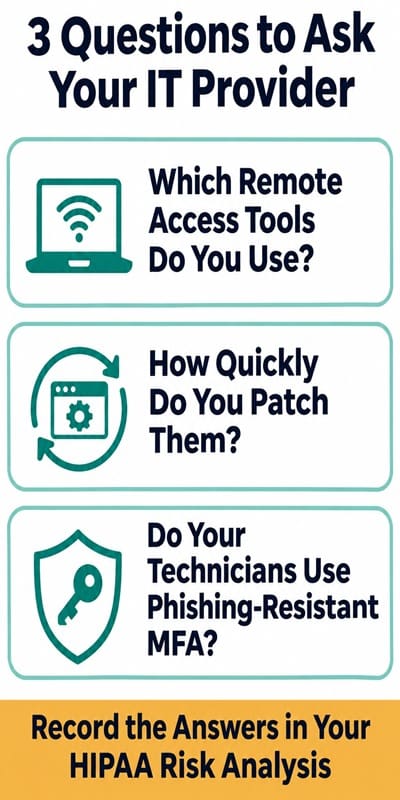
The access that makes your MSP useful also makes it a target. Remote monitoring and management tools give technicians privileged access to every machine they manage, so compromising 1 of those tools can open the door to every client at once. On June 29, CISA added a maximum-severity authentication bypass in SimpleHelp, a remote support and RMM product used by IT providers, to its Known Exploited Vulnerabilities catalog. In the attacks researchers documented, intruders forged login tokens, created rogue technician accounts with administrative rights, and used the tool’s own file transfer and remote execution features to push malware to every endpoint the compromised server managed. That kind of privileged access puts your IT company squarely inside your risk analysis under 45 CFR § 164.308(a)(1)(ii)(A), right alongside your EHR and billing vendors. Ask them which remote access tools they run on your machines, how quickly those tools get patched, and whether their own technicians log in with phishing-resistant MFA. A good provider will have answers ready. A great one will be relieved somebody finally asked.
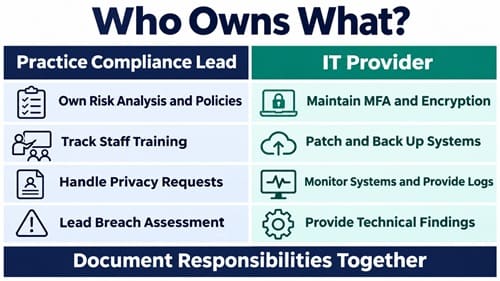
The practices that handle this well split the job on purpose. Someone inside the organization, often the practice administrator or an operations lead, holds the security and privacy official roles and owns the risk analysis, the policies, the training records, and the breach decisions. The IT company implements and maintains the technical controls, reports on them, and feeds what it sees into your risk management plan. A written responsibility matrix spells out who handles which safeguard, and both sides review it once a year (or after any incident that makes everyone suddenly very interested in who was supposed to do what). If your office manager’s first move after an OCR letter would be to email the IT company, you already know where your compliance program lives right now. Bring it in-house before the letter arrives, and keep the IT company on speed dial for the work they do best.
Recent Articles – Will Evertsen 


GlobalRPh Articles
Integrative Perspectives on Cognition, Emotion, and Digital Behavior

